
Paprel hosts an MCP server for each company. An agent connects to it over Streamable HTTP and sees only the tools its scope allows. When it creates an invoice, expense, or journal entry, that record lands as a draft that a person reviews and posts.
There is no MCP server for you to deploy. In an embedded product, each of your tenants is a Paprel company, so each tenant has its own server URL and its own boundary.
This post explains how a connection works and what an engineer should verify before putting an agent near a tenant's books.
How a Connection Works
Settings > App Connect > MCP Server     copy the company's MCP URL
        │
        ▼
Consent and scope                      a person approves what this connection may do
        │
        ▼
Tool discovery                         client receives only the tools that scope allows
        │
        ▼
Read  ──or──  Create                   reads return scoped data; creates land as drafts
        │
        ▼
Review and post                        a person posts the draft; the ledger validates balance
        │
        ▼
Activity                               every action attributed to the connection
1. Get the URL. Each company's MCP server URL is at Settings > App Connect > MCP Server. Copy it from there; don't construct or probe URLs.
2. Approve a scope. Off-the-shelf clients such as ChatGPT, Claude, and Cursor connect through Paprel's consent screen, where a person approves the connection.
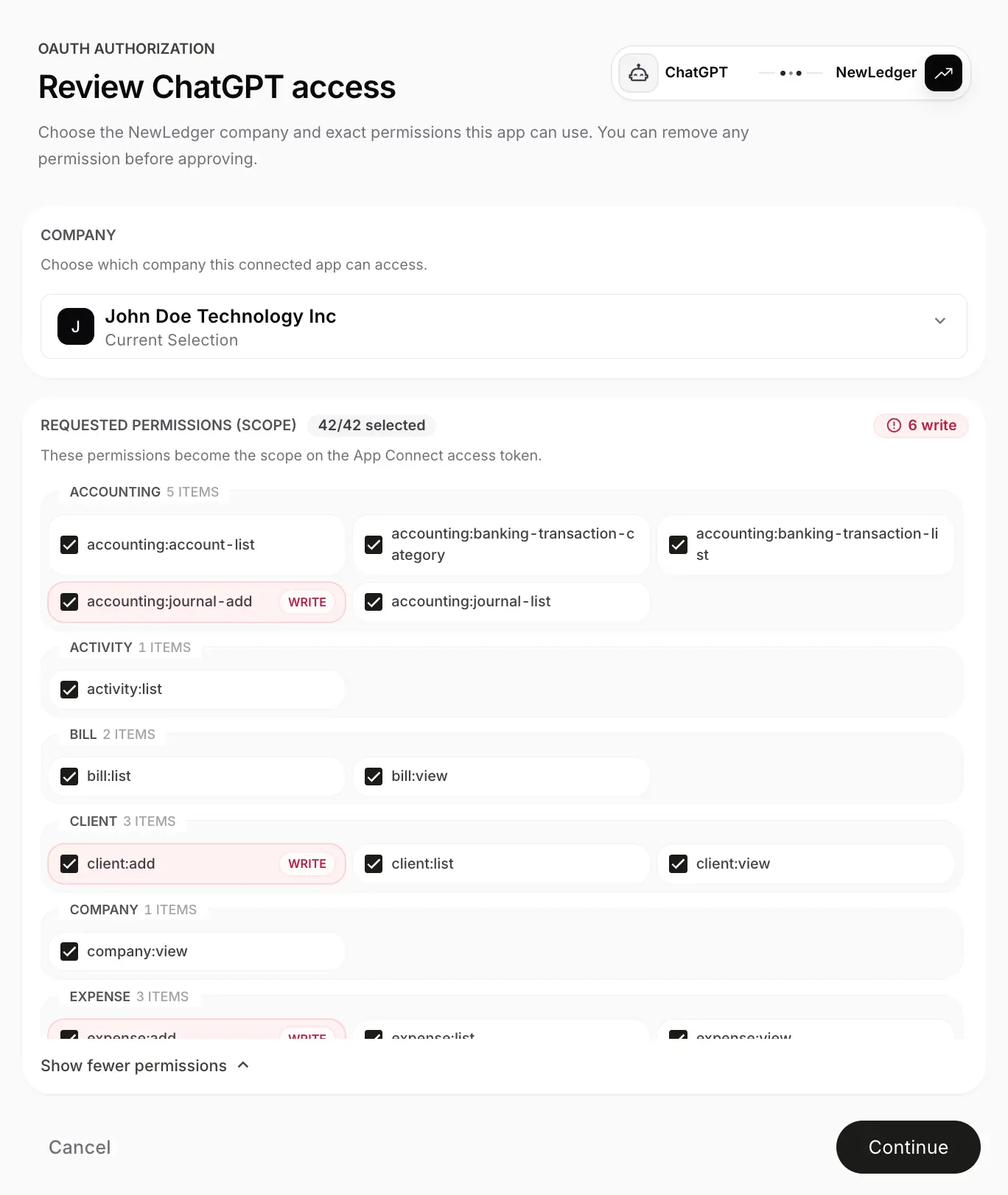
Access starts with an explicit approval tied to a known scope.
A custom agent connects to the same Streamable HTTP endpoint with a scoped bearer token, kept server-side:
import { MCPServerStreamableHttp } from "@openai/agents";

const paprel = new MCPServerStreamableHttp({
  name: "Paprel Accounting",
  url: process.env.PAPREL_MCP_URL!,
  requestInit: {
    headers: { Authorization: `Bearer ${process.env.PAPREL_MCP_TOKEN}` },
  },
});
The OpenAI Agents SDK here is one example client. The endpoint is standard MCP and isn't tied to any SDK. The full runnable example is in the custom agent guide.
3. Discover tools. The client lists the tools available to it. A read-only connection gets read tools and nothing else. The scope is the access control, not the prompt.
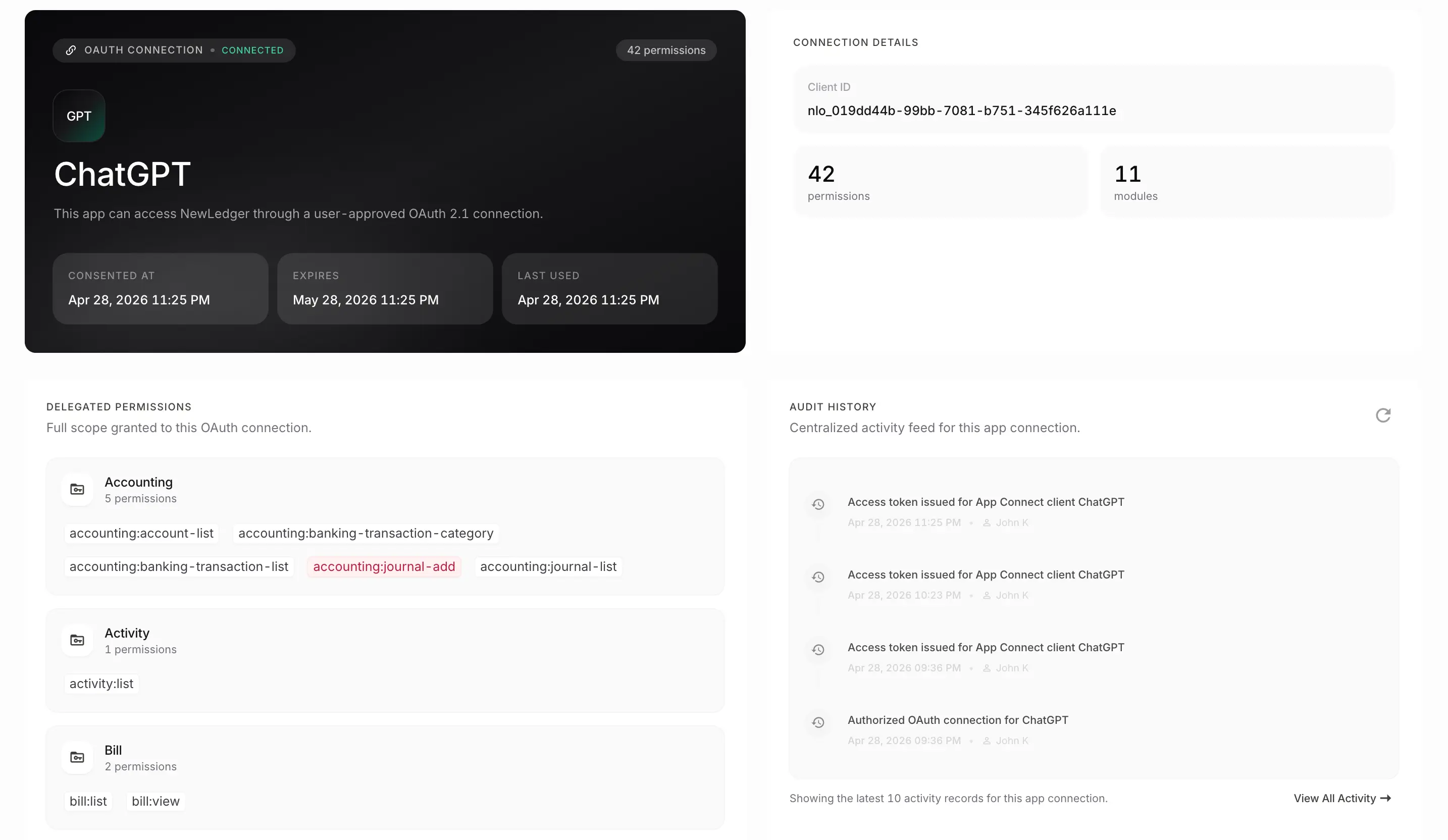
Each connection has its own details and scope, so you can review each one on its own.
4. Read or create. Reads cover statements, journals, records, and activity within scope.
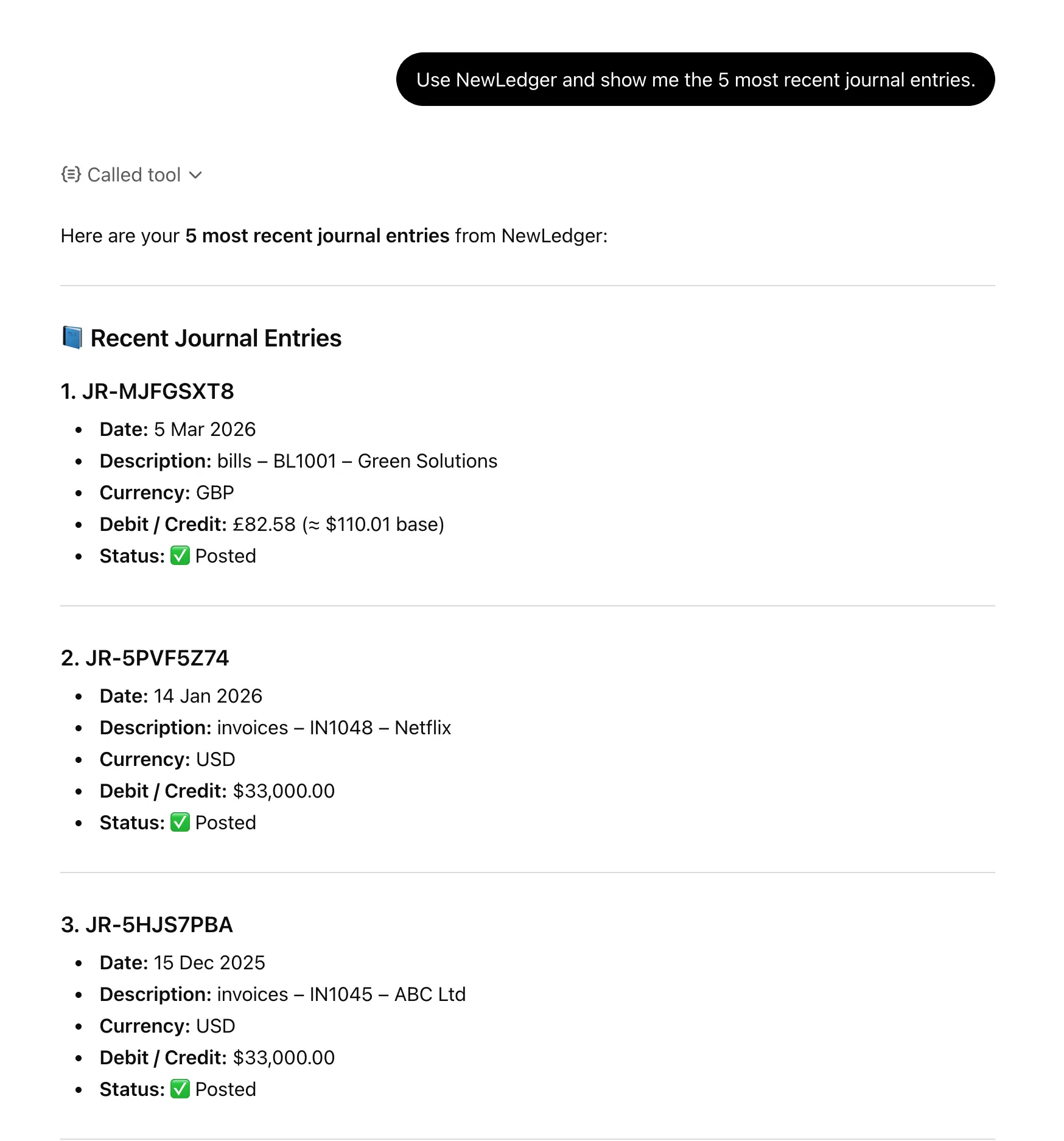
A journal-list call returns posted entries from the ledger, not an export.
Creates for invoices, expenses, and manual journal entries land as drafts:
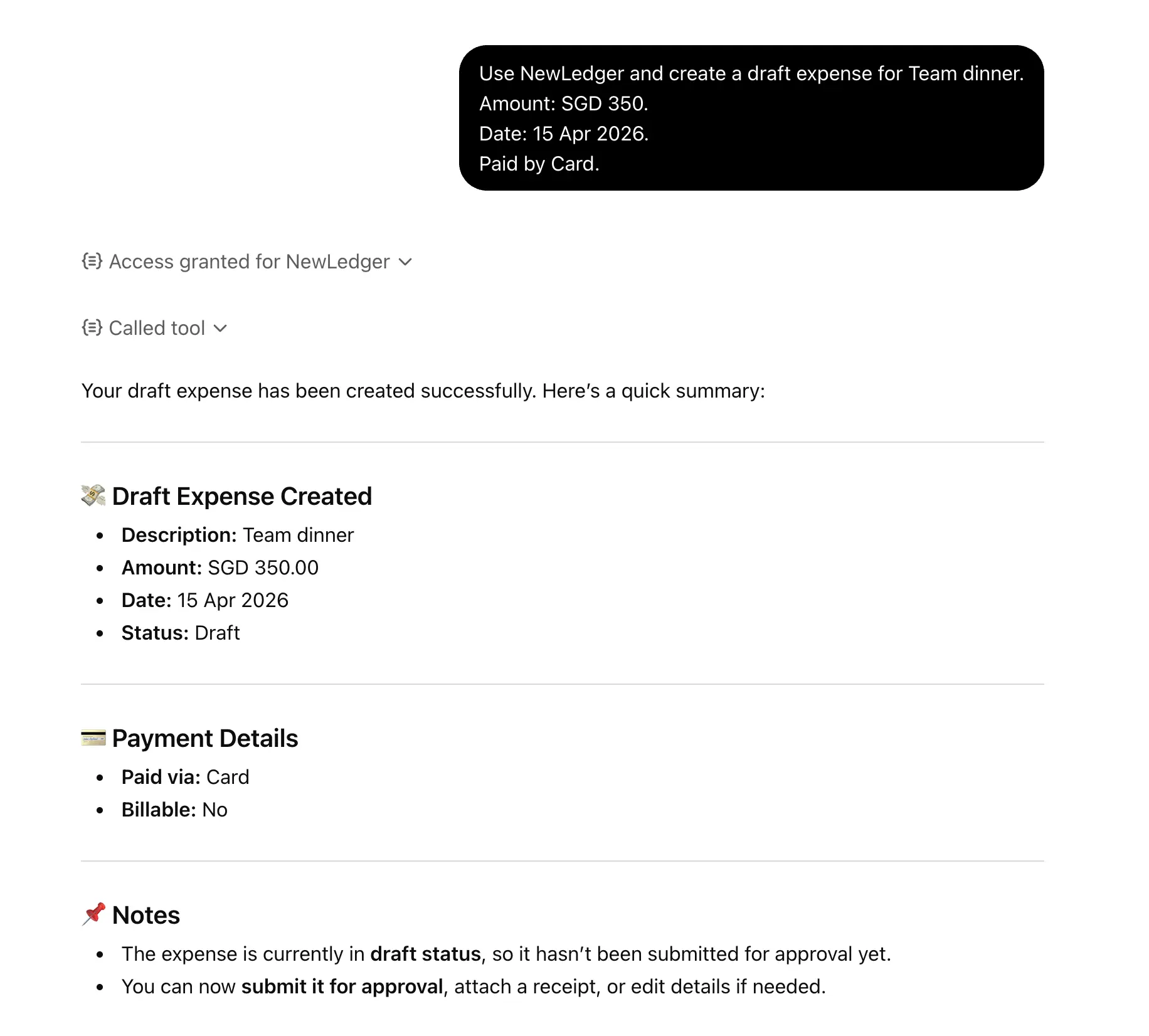
The agent prepares an expense. It stays a draft until someone posts it.
5. Review and post. A person opens the draft and posts it. The generated journal is checked for balance like any other write, and an unbalanced entry is rejected.
6. Audit. Every agent action is recorded against its connection. Query it with GET /v1/activity?source_type=app_connect&app_type=mcp_agent, and add app_connect_id to narrow it to one connection.
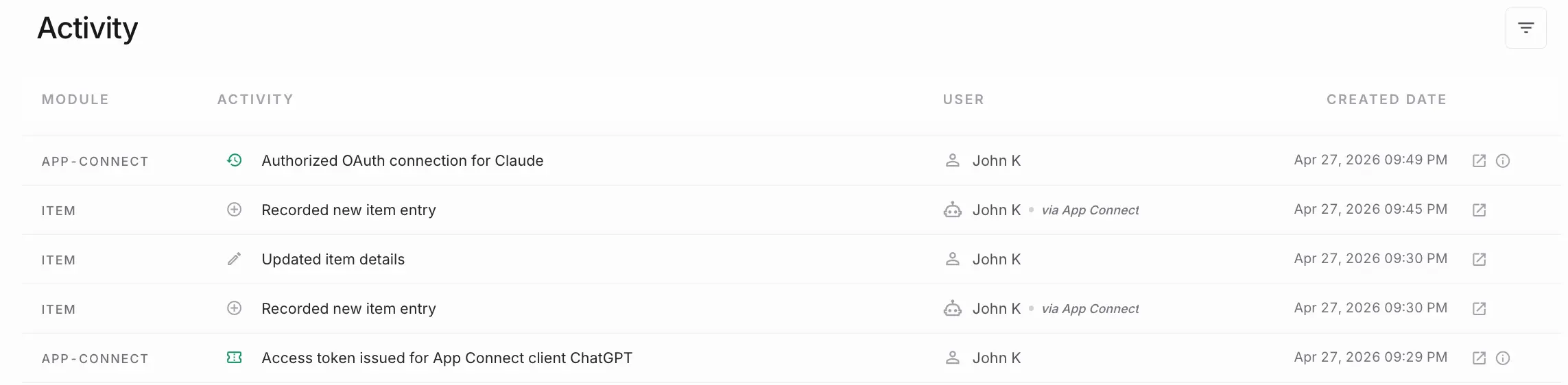
Agent activity, attributed to the connection that performed it.
The Writes That Skip the Draft Step
Three tools take effect immediately:
client_createcreates a client record.item_createcreates a product or service.banking_transaction_categorizecategorizes or matches a bank transaction.
An agent asked to "invoice the new customer" will create the client immediately if client_create is in scope, even though the invoice stays a draft. Leave these scopes off unless you want the agent to make those changes itself.
Why MCP Instead of Handing an Agent the REST API
You could give an agent a REST token and the OpenAPI spec. For an embedded product, MCP is the better boundary for three reasons:
- Discovery matches permission. The agent's tool list is its scope. It can't call what it can't see, and it doesn't spend tokens reasoning about endpoints it isn't allowed to use.
- Drafts are built into the tools. Agent creates arrive as drafts by design. Over REST, keeping agent writes reviewable is your job.
- One server per company. Tenant isolation is part of the URL and the token, not something your agent code has to get right.
REST is still the right choice for your own deterministic integration code. Use MCP for the agent and REST for the pipelines.
What to Verify Before Production
| Check | What to look for |
|---|---|
| Least privilege | A separate connection per environment and permission profile. Start read-only. |
| Immediate writes | client_create, item_create, and banking_transaction_categorize left out unless intended |
| Draft review | Someone owns the queue of agent-created drafts |
| Attribution | Activity filtered by app_connect_id shows what each agent did |
| Secrets | MCP tokens kept server-side and rotated when an agent or operator no longer needs access |
| Consistency | Agent answers match the reports, because both read the same journals |
Read Next
- Paprel MCP for AI Agents and Accounting Workflows: the hub, with tool groups and a worked draft invoice.
- Why AI Agents Need Structured Accounting Infrastructure: the failure modes this boundary prevents.
- AI-Ready Embedded Accounting: What to Verify: the evaluation checklist.
- Playbooks: AR, AP, P&L.
Building your own agent? Follow the custom agent guide.