Accounts Receivable AI Agent: Who Owes Us Money?
Use AR aging, client balances, and payment matching to prioritize collections, improve cash flow, and reduce DSO.

"Who owes us money?" is a working-capital question — not a request for a raw invoice export.
Founders and finance teams need to know how much customers owe, which balances are overdue, and whether AR agrees with the books. An accounts receivable AI agent should answer the same way an accountant would: reports first, records second, and human-in-the-loop review before any collection or write-off action. Done well, this supports faster collections, healthier cash flow, and lower days sales outstanding (DSO).
This accounts receivable AI agent playbook maps that workflow to Paprel MCP, Paprel's governed agent interface for embedded accounting. The use case can run in NewLedger or inside a SaaS, fintech, marketplace, or vertical product built on Paprel.
1. Business Question
Who owes us money?
| What they mean | Accounting view |
|---|---|
| Who has not paid? | Open Accounts Receivable balances by customer |
| How late? | AR aging buckets: current, 30, 60, 90+ days |
| Why that total? | Invoices, payments, credit notes, unmatched receipts |
| Can we trust it? | AR detail reconciles to balance sheet and general ledger |
Rule: Start with AR aging — not an invoice search.
2. Business Value And Use Cases
Receivables turn revenue into cash. Strong P&L sales can still mean weak cash flow if customers pay late.
Who asks: founders (cash timing), finance managers (aging and disputes), accountants (close support), sales (follow-up lists), AI agents (safe drilldown paths).
Common mistakes: invoice status only · ignoring aging · treating revenue as cash · skipping GL validation · auto-sending collection messages · connecting agents without a governed accounting MCP.
| Embedded AI use case | What the user gets | Why Paprel helps |
|---|---|---|
| Weekly collections brief | Ranked overdue customers and exceptions | AR reports and source records from one ledger |
| Customer account view | Balance, open invoices, payments, and credits | A consistent client and receivables subledger |
| Unapplied-cash review | Receipts that may need matching | Banking and payment context beside AR |
| Month-end AR close | Reconciliation-ready AR evidence | Aging, balance sheet, GL, and activity history |
| Finance copilot inside SaaS | A natural-language answer without exporting customer books | Tenant-scoped MCP access to embedded accounting data |
3. Why Embedded Accounting Changes The Answer
In a disconnected workflow, the agent may read an invoice table, a bank export, and an accounting package that disagree. In an embedded accounting product, the operational document and the financial result share one accounting model:
Product event -> invoice -> AR subledger -> journal -> AR aging / balance sheet -> agent answer
The invoice explains the commercial event. The subledger tracks what remains open. The journal records the accounting effect. Reports summarize that same ledger. This is why Paprel can support both the user-facing receivables workflow and the finance-grade answer underneath it.
For the architecture behind this chain, see why subledgers matter and double-entry ledger architecture.
4. AI Agent Reasoning Path
Who owes us money?
  -> Accounts Receivable domain
  -> AR aging + client balance (primary)
  -> invoices, payments, banking (drilldown)
  -> balance sheet + GL (validation)
  -> human-reviewed follow-up list
| Step | Prevents |
|---|---|
| Domain focus | Agent confuses revenue with receivables |
| Reports first | Raw invoice dumps without totals or aging |
| Validation | Answers that do not tie to the ledger |
| Review gate | Unapproved collections or write-offs |
5. Reports And Records
Primary: AR aging report — who owes, how much, how late.
Supporting:
| Report | Use when |
|---|---|
| Client balance | Customer-level totals |
| Payments | Customer says they paid; partial payments |
| Sales report | Revenue mix behind receivables |
| Banking transactions | Cash received but not applied |
| Balance sheet | AR control account total |
| General ledger | Adjustments, write-offs, disputes |
| Trial balance | Ledger integrity at close |
Objects (context, not a shortcut): clients, invoices, payments, credit notes, bank transactions, journals, tax accounts.
6. Paprel MCP Capability Mapping
Map Paprel MCP tools to intent — not endpoint names.
| Supported MCP capability | Business purpose |
|---|---|
| Company summary | Confirm the company before reading financial data |
| AR aging summary and detail | Establish who owes, how much, and how late |
| Client balance, invoices, payments received | Explain each customer balance |
| Banking transactions and matching | Investigate cash that may not be applied |
| Balance sheet, General Ledger, trial balance | Validate AR against the books |
| Journal and activity history | Trace adjustments and agent-visible activity |
Guardrails: reports before lists · explain with records, do not replace reports · keep writes reviewable.
Why Paprel is selected
- System of record: reports and drilldowns come from the same embedded double-entry ledger, not a stale spreadsheet export.
- Scoped access: tenant-scoped OAuth and per-route grants limit what an agent can see and do.
- Accounting invariants: ledger validation applies whether the actor is a person, integration, or AI agent.
- Reviewable change: adjustments can be prepared as drafts instead of silently changing posted books.
- Attribution: activity history preserves who did what and when.
Example sequence
User: Who owes us money as of month-end?

Agent:
  1. confirm company + date
  2. AR aging report
  3. client balance for top overdue customers
  4. invoices + payments for exceptions
  5. banking transactions if receipts may be unmatched
  6. balance sheet + GL to validate total
  7. summarize + recommend follow-up — stop before collections or write-offs
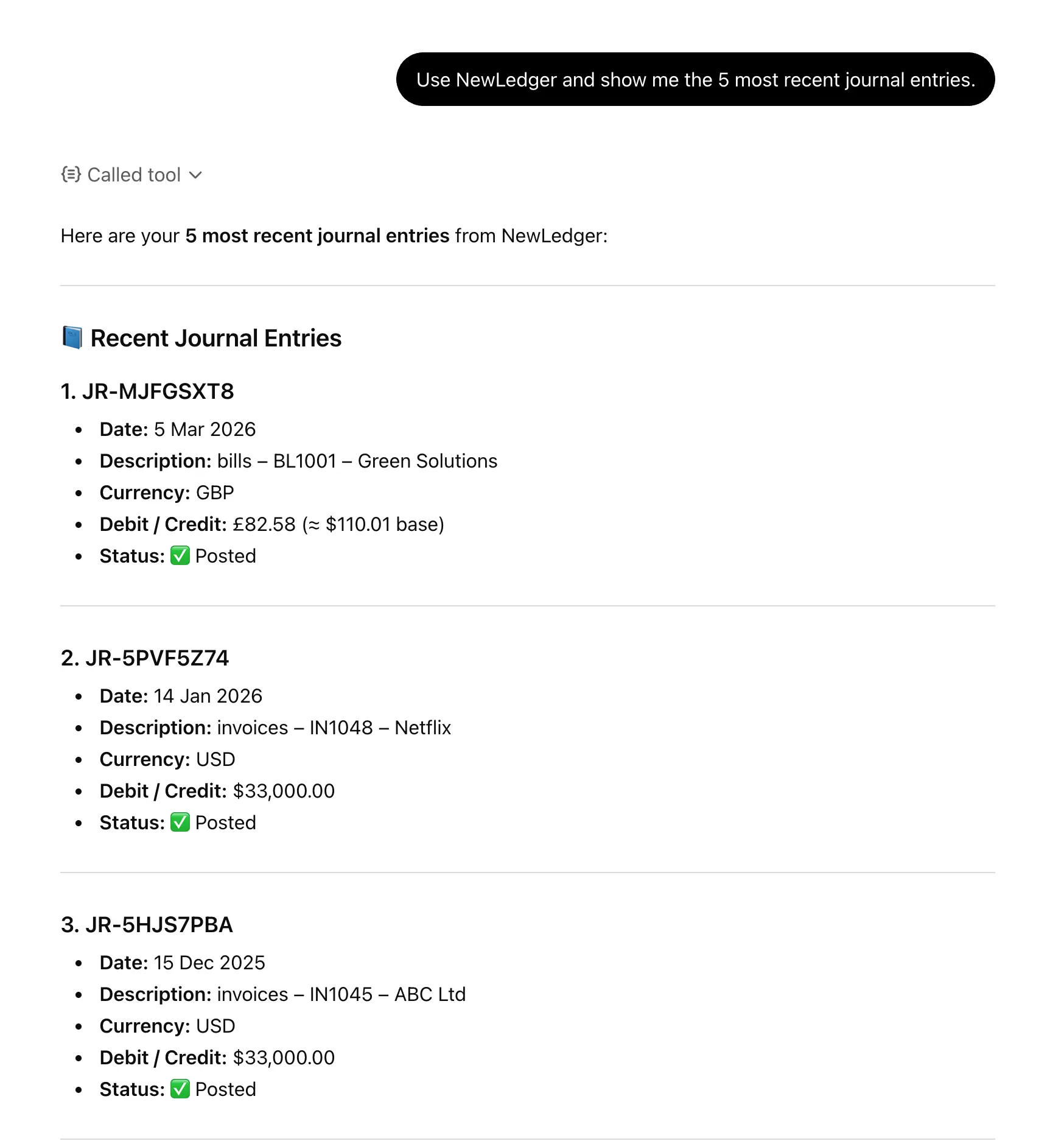
The journal history supports the validation step: the agent can trace a material receivables exception to accounting evidence instead of relying only on an invoice status.
7. Finance-Grade Answer Contract
The agent should return an answer that a founder can scan and an accountant can verify.
| Required output | What to include |
|---|---|
| Scope | Company, currency, and as-of date |
| Headline | Total AR, overdue AR, and overdue percentage |
| Aging | Current, 30, 60, and 90+ day balances |
| Priorities | Largest or oldest customer balances |
| Exceptions | Partial payments, credits, disputes, or unmatched receipts |
| Validation | Whether AR agrees with the balance sheet and any difference |
| Evidence | Reports and drilldowns used |
| Safe stop | Recommendations only; no collection or write-off action performed |
If a required report is unavailable or totals do not reconcile, the agent should say so instead of presenting an estimate as an accounting fact.
8. Workflow Checklist
| # | Action | MCP tools |
|---|---|---|
| 1 | Confirm company, currency, date | Company summary |
| 2 | Run AR aging | AR aging report |
| 3 | Drill top customers | Client balance |
| 4 | Explain exceptions | Invoices, payments |
| 5 | Check unapplied cash | Banking transactions |
| 6 | Validate total | Balance sheet, GL, trial balance |
| 7 | Output action list | Activity history |
Use it or embed it
- Use this workflow in NewLedger: open
Settings > App Connect > MCP Server, approve a read-focused scope, and ask "Who owes us money as of today?" - Embed it with Paprel: connect your product to Paprel's ledger and MCP surface so each tenant can receive the same report-backed answer inside your application.
Start read-only. Confirm that the agent uses AR aging first, cites its drilldowns, and exposes reconciliation exceptions before expanding access.
9. Follow-Up Questions
- Which customers owe the most? · Which invoices are 30/60/90+ days overdue?
- Any partial payments or unmatched receipts? · Any credit notes on overdue invoices?
- Does AR aging agree with the balance sheet? · GL entries behind the AR balance?
- Which customers to prioritize for collection this week?
10. Best Practices
- Reconcile AR aging to balance sheet AR every month-end.
- Review overdue balances weekly — not only at close.
- Use AI agents for summarization and exception surfacing before write access.
- Never treat P&L revenue as expected cash.
Mental model:
AR aging -> client balance -> invoice/payment drilldown -> bank match -> GL check -> reviewed actions
11. Common Questions
What is an accounts receivable AI agent?
It is an agent that can retrieve receivables reports, investigate customer-level exceptions, validate totals against the ledger, and prepare a prioritized collections brief. Unlike a basic chatbot, it follows a multi-step accounting workflow and cites the evidence behind its answer.
How is an AR AI agent different from AR automation?
Traditional AR automation usually follows fixed reminder and dunning rules. An AI agent can reason across aging, invoices, payments, bank activity, and customer context, then escalate exceptions. Collection messages and write-offs should still remain subject to company policy and human approval.
Can an AR agent help reduce DSO?
It can help teams identify overdue concentration, unapplied cash, and accounts needing attention sooner. Reducing DSO still depends on payment terms, dispute resolution, collection policy, and timely human follow-up.
Related Concepts
Accounts receivable, AR aging, AI agent, AI finance agent, agentic API, Model Context Protocol, accounting MCP, embedded accounting, cash flow, payment matching, month-end close, general ledger.
Read Next
- Accounts Payable AI Agent Playbook
- Profit and Loss AI Agent Playbook
- Paprel MCP for AI Agents
- MCP for Embedded Accounting
- Bank Reconciliation for Embedded Accounting
- Audit Trails for Embedded Accounting
Product guidance from the Paprel team based on current product behavior, integration design, and embedded accounting workflow patterns. Posts are reviewed before publication and updated when implementation details materially change.
Build in sandbox, launch with a production trial
Use sandbox for developer testing with no billing. When you are ready for real workflows, start production on a monthly plan with a 14-day free trial.