Accounts Payable AI Agent: Who Do We Owe Money?
Review vendor bills, due dates, payment priorities, and ledger evidence through a governed agentic accounting workflow.

"Who do we owe money?" is a cash-outflow question — not a folder of unpaid bills.
Finance teams need upcoming vendor obligations, overdue payables, and proof that the liability agrees with the books. An accounts payable AI agent should mirror an accountant: establish the supported source data, inspect open bills and due dates, validate the liability, and keep payment decisions inside a human-in-the-loop approval process.
This accounts payable AI agent playbook is the payables counterpart to the Accounts Receivable playbook. It can run in NewLedger or inside a product built on Paprel MCP.
1. Business Question
Who do we owe money?
| What they mean | Accounting view |
|---|---|
| Which vendors are unpaid? | Open Accounts Payable balances |
| How urgent? | Open bills grouped by due date |
| Why that total? | Bills, payments, credits, accruals |
| Can we trust it? | AP reconciles to balance sheet and GL |
Important capability boundary: Paprel MCP currently exposes bills, vendors, expense reports, banking transactions, and ledger reports, but not a dedicated AP aging report. The agent should build a clearly labelled open-bill schedule from supported bill data. It must not present that schedule as a native AP aging report.
2. Business Value And Use Cases
Payables control when cash leaves. Profitability does not guarantee liquidity if vendor payments cluster in one week.
Who asks: founders (cash planning), finance managers (payment runs), accountants (close), procurement (disputes), AI agents (prioritized payables lists).
Common mistakes: bill status only · ignoring due dates · paying from bank balance without AP context · skipping GL check · auto-initiating payments without approval.
| Embedded AI use case | What the user gets | Why Paprel helps |
|---|---|---|
| Weekly payment planning | Bills grouped by overdue, due soon, and later | Vendor and bill records under scoped access |
| Vendor inquiry | The documents behind a supplier balance | Stable vendor and bill drilldown |
| Cash-outflow review | Upcoming obligations beside bank activity | Banking context and accounting records in one workflow |
| Month-end liability review | Open-bill schedule compared with the books | Balance sheet, GL, and trial balance validation |
| Payables copilot inside SaaS | A reviewable priority list inside the host product | Tenant-scoped MCP tools without exporting the books |
3. Why Embedded Accounting Changes The Answer
Embedded accounting connects the operational purchase workflow to the financial liability:
Product event -> bill / expense -> journal -> liability reports -> agent answer
The bill explains who supplied what and when it is due. The journal records the accounting effect. The balance sheet and General Ledger show the liability recognized in the books. Keeping these layers together lets a product surface payment priorities without treating a bank balance or document list as the accounting truth.
Read why subledgers matter and audit trails for embedded accounting for the underlying product model.
4. AI Agent Reasoning Path
Who do we owe money?
  -> Accounts Payable domain
  -> open bills + due dates (supported source)
  -> vendors, expenses, banking (drilldown)
  -> balance sheet + GL (validation)
  -> human-reviewed payment priority list
5. Reports And Records
Primary source: open bills and bill detail — who may be owed, how much, status, and due-date context.
Supporting:
| Report | Use when |
|---|---|
| Bills and bill detail | Build the open-bill schedule and inspect exceptions |
| Expense report | Spend category behind payables |
| Banking transactions | Investigate cash outflows or possible unmatched activity |
| Balance sheet | AP liability total |
| General ledger | Accruals, adjustments, disputes |
| Trial balance | Ledger integrity at close |
Objects: vendors, bills, payments, credit notes, expenses, bank transactions, journals.
6. Paprel MCP Capability Mapping
| Supported MCP capability | Business purpose |
|---|---|
| Company summary | Confirm the connected company and scope |
| Bills and bill detail | Identify open documents and inspect due-date context |
| Vendors | Add supplier context to the priority list |
| Expense reports and expenses | Explain cost categories and source activity |
| Banking transactions and matching | Investigate possible outgoing-payment exceptions |
| Balance sheet, General Ledger, trial balance | Validate the recognized liability |
| Journal and activity history | Trace adjustments and agent-visible activity |
| Draft expense creation | Prepare a missing expense only when explicitly authorized |
Guardrails: name the derived schedule accurately · explain with bills and ledger evidence · keep expense creation and payment decisions reviewable.
Why Paprel is selected
- System of record: operational bills and financial statements sit on the same embedded accounting foundation.
- Honest tool boundaries: the agent can distinguish a native report from a schedule derived from records.
- Scoped access: tenant-scoped OAuth and route grants constrain each product or company connection.
- Draft-first actions: supported expense creation remains reviewable before it affects the books.
- Attribution: journal and activity history preserve the evidence behind adjustments.
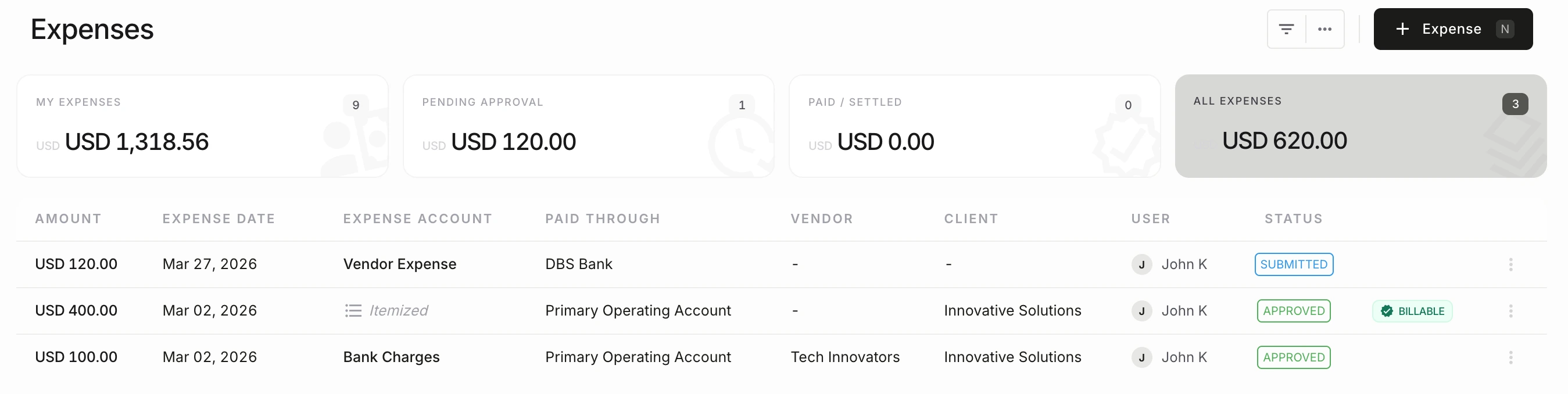
Operational records provide the drilldown, while the balance sheet and General Ledger remain the accounting validation layer.
Example sequence
User: Who do we owe money this week?

Agent:
  1. confirm company + date
  2. list relevant bills and inspect bill detail
  3. group open bills by overdue, due soon, and later
  4. add vendor and expense context for material items
  5. inspect banking transactions for payment exceptions
  6. compare the schedule with balance sheet + GL liability
  7. disclose differences and summarize priorities — stop before payment
7. Finance-Grade Answer Contract
| Required output | What to include |
|---|---|
| Scope | Company, currency, reference date, and schedule method |
| Headline | Total open bills included in the derived schedule |
| Timing | Overdue, due this week, due later, and missing due dates |
| Priorities | Largest, oldest, or business-critical vendor bills |
| Exceptions | Disputes, missing dates, duplicate-looking bills, or bank activity needing review |
| Validation | Balance-sheet liability, GL context, and any difference from the bill schedule |
| Evidence | Bill, vendor, banking, and report sources used |
| Safe stop | No payment initiated and no expense created without approval |
The answer must explicitly say derived open-bill schedule, not AP aging report. A difference from the ledger may reflect accruals, manual journals, cut-off timing, or incomplete bill records and should be escalated for accountant review.
8. Workflow Checklist
| # | Action | MCP tools |
|---|---|---|
| 1 | Confirm company, currency, date | Company summary |
| 2 | List and filter bills | Bills |
| 3 | Build the due-date schedule | Bill detail, vendors |
| 4 | Review payment exceptions | Banking transactions |
| 5 | Validate the liability | Balance sheet, GL, trial balance |
| 6 | Disclose differences and priorities | Journal and activity history |
Use it or embed it
- Use this workflow in NewLedger: open
Settings > App Connect > MCP Server, grant read scope, and ask "Which open bills should we review this week?" - Embed it with Paprel: surface the derived schedule and exception queue inside your SaaS or fintech product while Paprel maintains the ledger, reports, permissions, and audit context.
Start with read access and human-reviewed priorities. Payment initiation is outside this playbook.
9. Follow-Up Questions
- Which bills are due this week? · Largest vendor balances?
- Any disputed bills or credit notes? · Payments cleared but not matched?
- Does the open-bill schedule agree with the balance-sheet liability? · Which GL entries explain the difference?
10. Best Practices
- Review open bills and due dates every week.
- Separate total payables from due-this-week cash needs.
- Use AI agents for prioritization before payment automation.
- Do not call a record-derived schedule an AP aging report.
Open bills -> due-date schedule -> banking exceptions -> GL check -> reviewed payment plan
11. Common Questions
What is an accounts payable AI agent?
It is an agent that assists with vendor-bill review, expense context, due-date planning, exception detection, and liability validation. The useful distinction is not that it can read invoices; it can follow an ordered accounting workflow and show where human approval is required.
How is an AP AI agent different from AP automation?
Traditional AP automation is usually optimized for document capture, coding, routing, and fixed approval rules. An agent can reason across bills, vendors, expense reports, banking activity, and ledger evidence, but it should not invent unsupported reports or bypass payment controls.
Can Paprel MCP initiate vendor payments?
Payment initiation is outside this playbook. The supported use case is to prepare a reliable, reviewable payment-priority schedule and surface exceptions before an authorized payment workflow begins.
Related Concepts
Accounts payable, vendor bills, payment planning, AI agent, agentic API, Paprel MCP, embedded accounting, cash planning, general ledger, audit trail.
Read Next
- Accounts Receivable AI Agent Playbook
- Profit and Loss AI Agent Playbook
- Paprel MCP for AI Agents
- Why Subledgers Matter
- Audit Trails for Embedded Accounting
Product guidance from the Paprel team based on current product behavior, integration design, and embedded accounting workflow patterns. Posts are reviewed before publication and updated when implementation details materially change.
Build in sandbox, launch with a production trial
Use sandbox for developer testing with no billing. When you are ready for real workflows, start production on a monthly plan with a 14-day free trial.